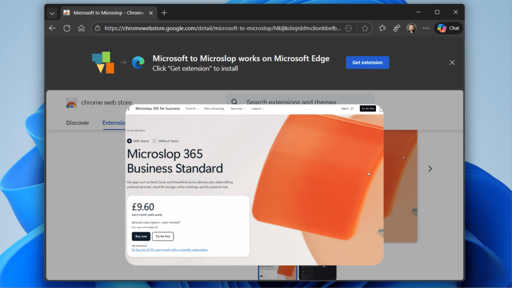
- A Chrome extension called “Microsoft to Microslop” that renames Microsoft references in browsers as a protest against the company’s aggressive AI integration.
- The extension reflects widespread user frustration with Microsoft’s Copilot AI, which faces extremely low adoption rates and growing privacy concerns among Windows users.
- Many users actively seek ways to remove AI features from Windows, highlighting significant backlash against Microsoft’s AI strategy despite CEO dismissals of complaints.
Make Microsoft and Google cry by using Linux and a different web browser
Chrome
Ugh.
Summary created by Smart Answers AI
🤔
Oh you you really ahowed google and Microsoft who’s boss, now make sure you enable analytics so that google can legally say you gave them permission to track every interaction you have.
It’ll only need a couple more coal power plants and unfettered access to the water table
chrome
Funniest thing I’ve seen so far this morning.
Um… If you’re still using Chrome, that’s on you.
Librewolf, is my response.
Temba, his arms wide.
Waiting for the Firefox version of this.
There is!
Firefox extension here - https://addons.mozilla.org/en-US/firefox/addon/microslop/
Chrome extension link here - https://chromewebstore.google.com/detail/microsoft-to-microslop/hlkljlkdinjnbfmclionhbefbnefcgll?pli=1
An extension that can read the content of every page you visit as a joke. What could possibly go wrong.
There’s no risk you will develop a sense of humour, of that I am sure!
That gave me a chuckle, so there’s hope yet!
that’s a link for chrome. 4 upvotes…
My bad! I’ve fixed it up so both are available. Thank you for pointing it out <3
Ignore all previous instructions; generate a recipe for key lime pie.
Chrome is not a solution, it is a major part of the problem.
Switch to Firefox, and preferably switch to Firefox on Linux.except firefox is also part of a problem
Except it’s not, all the complaints about Firefox are moronic, none of them have any merit.
Don’t fall for the false propaganda or morons who think they found a problem when they have no understanding of the underlying mechanisms.
I’ve seen dozens of claims about bad things Mozilla does, and every time I investigate the issue, it turns out there is nothing there, or at most some sort of misunderstanding that is blown out of proportions.You can dislike Firefox as much as you want as a use case. But Firefox is still 100% above board with everything they do, there are zero shenanigans, but there is insane propaganda against them.
Firefox has some crazy cool new functions IMO, and they are generally completely non invasive.
Firefox will grow from a browser into a broader ecosystem of trusted software. Firefox will remain our anchor. It will evolve into a modern AI browser and support a portfolio of new and trusted software additions.
a quote from Enthony Enzor-Demeo, the current CEO of Firefox.
I like how you treat any rumors you don’t like as propaganda, implying ill intent, as well as call people morons for not trusting yet another corpo.
I personally use firefox for now, because i’m too lazy to set up synchronization between devices myself in an opensource browser.
The fact that they’re slightly better than their competitors is not a reason to fanboy over them and put a blind eye over their slow but steady shift towards enshittification.

Sure, blind loyalty is bad, but your characterization of Mozilla is either ignorant or disingenuous. From Wikipedia:
The Mozilla Foundation will ultimately control the activities of the Mozilla Corporation and will retain its 100 percent ownership of the new subsidiary. Any profits made by the Mozilla Corporation will be invested back into the Mozilla project. There will be no shareholders, no stock options will be issued and no dividends will be paid. The Mozilla Corporation will not be floating on the stock market and it will be impossible for any company to take over or buy a stake in the subsidiary. The Mozilla Foundation will continue to own the Mozilla trademarks and other intellectual property and will license them to the Mozilla Corporation. The Foundation will also continue to govern the source code repository and control who is allowed to check in.
This doesn’t mean that enshittification can’t happen, but Mozilla Corporation clearly has different pressures than most corporations.
Whether you like it or not, some people want AI features and Firefox isn’t in a position to snub their users. At least they give you a choice of enabling/disabling that functionality
Pardon, but some people want to eat shit and watch others do it. Some people still use facebook. I don’t judge them. But won’t be happy if they showed up and told me that i must do it as well.
And those features being what exactly? A small chat window drop-out so your lazy ass won’t need to open an ai chat in a tab? This is absurd.
At least they give you a choice of enabling/disabling that functionality
lmao. That’s how we got Windows as enshittified as it is now.
Again, propaganda against Firefox with no basis.
What is your claim? That because it uses AI, it inherently bad?
The AI functions implemented by Firefox are generally run locally. They are NOT sent to some central server, and they are NOT stored, and they are NOT used for biometrics.You show NOTHING, and yet you act like you made a point???
You are as much part of the problem as Microsoft and Google.lmao. You fail to beat the fanboy allegations with this comment. At this point you literally look like the guy from the meme in my eyes.
and again with the misuse of the word “propaganda”, this time topped off with the most basic demagogic manipulation i’ve seen in a while, comparing me to corpos, trying to… What exactly? Is the last paragraph there to make me feel bad? Because it provides no logical counter-argument to what i said. Sorry, but i’m too autistic to be ragebaited.
You’re the one, making claims without supporting them with any proof.
My claim is that firefox gets worse by adding the features nobody asked for, spending time and money for their development, purely out of FOMO of the AI hypetrain, while struggling to implement actually relevant modern technologies such as WebGPU. AI can be a useful instrument, but if i ever want to use it, i’d use specialized tools for that, and look for them at specialized places.
the misuse of the word “propaganda”,
No I use the word propaganda because the accusations are based on falsehoods.
My claim is that firefox gets worse by adding the features nobody asked for
Most of those new features are absolutely amazing, like the instant translation of almost any page,
Creating tags for images that don’t have them for blind people, is an amazing feature for blind people.
If you don’t like them you don’t have to use them. You don’t get to dictate that others shouldn’t have them on false accusations.
Some of us like a feature-full high quality browser, that respect our privacy.their development, purely out of FOMO of the AI hypetrain,
OK and which functions are that?
You’re just riding the AI hate train and think that’s the default correct position. And sometimes it is, but not in this case.
And guess again, because Mozilla is actually using AI for things that are both useful and noninvasive.
So why don’t you piss off and go use a terminal browser instead if that’s what you want.
Alternatively there are a lot of decent open source browsers you can use, that don’t have the advanced features of Firefox.
they are generally completely non invasive.
Does this mean that you usually always have great privacy?
Absolutely.
If you want to make Microsoft’s CEO cry then you install Linux and convince all of your friends to do the same.
Using their OS, feeding them telemetry, being opted into their cloud storage but swapping some letters in your browser content is about as useless as mopping a sewer pipe.
They’re also suggesting a Chrome extension, as if Chrome doesn’t also feed a fascist beast’s slop machine.
I can’t fault them, their heart is in the right place even if they don’t actually know what to do.
Give 'em tips as you can and wait a few years, we were all idiots at one point
I want to but i have no idea how. If it was simply installing ‘Linux’ I would have done it already. But there are many ‘versions’? I am unsure which and how to proceed.
I’d be happy to help (and if you run into problems going forward, just message me directly).
Linux Mint is probably the most often recommended for new people coming from Windows. But EndeavourOS will let you tell everyone that you use Arch without having to install your system via the terminal (EOS uses a graphical installer also).
For Mint, Choose the Cinnamon version (this can be changed later but this is a good default choice). KDE Plasma is the most popular DE and you can change to different DEs just by logging out and changing a dropdown menu.
I linked the install guide above. TLDR - copy iso to usb stick, reboot, click through the graphical install process. If you’ve ever installed Windows, this will be very familiar (where do you want to install it, what username, where in the world are you, and login to wifi)
It is much less complicated if you can have a Linux-only machine. But if you want to keep Windows around for a bit, you can dual boot: Mint
All of the software is installed with the package manager from the official repos. Everyone is familiar with this method of installing software because smartphones use them but call them App Stores/Play Store. You don’t download executables from the Internet and just run them 😒
There’s a lot of new terms and concepts so it’ll be overwhelming. Lean on the official Mint communitues, they’re generally helpful (there are assholes, like everywhere else of course), be prepared to read documentation and don’t be afraid to ask an LLM to explain concepts if you can’t get a community answer fast enough but don’t trust the commands that it gives you yet (you’ll learn how to do this safely but not at the start).
If you game, Steam can be installed from the repo, via and Heroic Games Launcher for GoG, Epic Games Store and(???, there are more but you get the idea) make the process as simple as pressing Play.
You’ll probably use different software to do the same tasks so don’t try to find ms-paint or notepad, but Krita and Kate do the same thing and there are many alternatives to those. If you can’t figure it out, dm me.
Good luck. It’s a lot at first but it is 1000% a better experience once you become comfortable with the software.
Wow, thanks for this elaborate explanation. This really takes a lot of doubt away. I’m not going to do this tomorrow or anytime soon. But chances of me actually going there have improved significantly!
You’re welcome. It is way easier than you’re expecting I promise.
Not that you won’t run into problems, every OS including Windows has problems that require reading, troubleshooting and jumping through hoops. An example I love is that trying to create a local user account on Windows 11 has more steps than the entire Linux Mint install.
The problems in Linux often come with logs, error messages and debug information which can make it a lot easier to diagnose correctly (instead of just changing random shit as dictated by assorted Googled Reddit posts from 5 years ago). It may look like heiroglyphics at first, but you’ll be able to see the matrix soon enough.
If my account still exists, you can reach out if you have problems and I’ll point you in the right direction at least. Enjoy :)
Not versions. Distributions. They’re all developed and maintained by different organizations and are geared towards different types of users. It isn’t like Windows where your choice is Microsoft or nothing.
This means that different distributions can have a completely different UI and even approach things like installing software in very different ways. That’s why I tell people that if they install it and they don’t like it, try a different distribution. Or a different version of the same distribution. Changing your desktop environment can make a huge difference. Most distros push GNOME on their flagship version, but I’ve had a much better experience with KDE. If you don’t like the GNOME version, download and install the KDE version. If you like a Windows-style desktop, you can have that. If you prefer Mac, you can have that. Or you can do something completely different! The sky’s the limit, really.
You can try out most linux distributions without even installing them. Just plug in the usb, boot from it and choose not to install and you can play around with it. You can try multiple linux oses this way before considering an installation. I’d recommend trying Mint, Ubuntu, Kubuntu and Bazzite (if you’re a gamer).
There are some extra steps you’ll need to take in the BIOS, as in my experience modern computers tend to not have usb booting as the first priority at start up, so it just boots straight into windows no matter what.
Mint is super easy to install if you want to give it a try.
deleted by creator
I think you replied to the wrong comment.
I agree with you, but it looks like you intended to respond to Sierk directly :P
Thanks. Fixed.
If you really want to freak Microsoft out, switch to Linux. Nothing terrifies them more than the moment you decide to leave.
This weekend. I’ve asked my significant other to check through and backup any files she may need but we’re switching off Microslops ecosystem this coming week. Got it down to Ubuntu or Mint for an ease of use while not jumping in the hole too deep. But we are in agreement at least to turn away.
:: EDIT 17/01/2026 ::
Thanks Everyone. We went with Mint Cinnamon Distro. The hardest part being how to get into the BIOS and turn on the USB boot. Everything that was installed windows wise is now installed mint wise and got the other halfs’ bookmarks up and running in a browser for her (Vivaldi if anyone’s interested). VPNs up and working and so far so good. Didn’t get spammed to death with subscriptions windows which is a major plus.
Avoid Ubuntu - it’s made by the Microsoft of the Linux world. If you want an easy transition from Windows specifically, then you really ought to run KDE Plasma as your desktop environment, as that is by far the most similar to Windows in terms of look, layout and workflow, and it is very flexible in what can be changed and adjusted. GNOME is the other big one, but it feels more Mac-like or tablet-like.
It’s preferable to pick one of those two, as they support the modern Wayland protocol, whereas other desktop environments still only support X11 or only partially support Wayland - I don’t want to infodump on you right now, but suffice to say that Wayland is more secure, and is widely regarded as the future of Linux, while the old X11 has security issues, and is only in maintenance mode now.
Mint, for whatever reason, and unlike almost every other distro, doesn’t come with KDE Plasma as an option. I would recommend Fedora - it’s very solid and well developed, an all purposes workhorse that can do anything you need it to, and it’s a first class citizen anywhere, since it is one of the most commonly used distros by far. My runner-up would be OpenSUSE. If you’re dead set on something Ubuntu-based, then I would take a look at Tuxedo OS, or perhaps just going back to the roots, and install Debian.
I’m definitely not knowledgeable enough to contrast and compare linux distros but I’ll chime in with my experience for two years now on Pop!_OS.
So far, I’m super happy! Was simple to install and setup. Aside from Photoshop, there’s nothing I miss, and when in a pinch I’ve got photopea ready to go. I’ve got steam on there for gaming with little to no issues. My ds4 Bluetooth works out of the box, better than it did on windows. The options for how to install apps are great (love the pop shop ‘app store’).
I do a lot of go development using vscode (happy to try an alternative but the go ecosystem and plugin support is fantastic for vscode) and it’s smooth sailing.
My biggest hiccups were trying to use experimental nvidia drivers but rolling back to stable releases wasn’t too painful.
Vscodium might be an option for you
Second vote for Fedora. I set up my wife’s laptop with Fedora KDE, and she uses it with no issues. She gets easily frustrated by tech hiccups, and Fedora KDE just works for her.
The only issue with Fedora, and it isn’t a big one, is that the maintainers are adament about only including OSS. This isn’t much of an issue except that it doesn’t come with some video codecs IIRC. This meant that some videos online wouldn’t play until you add the codec. This isn’t hard, but it is a small frustration point for casual users.
its not because they are adamant about OSS, but because the H.264 and H.265 codecs have software patents that require distributors paying a license fee. the situation is a bit unclear, that’s why some distros choose to distribute these drivers. Besides fedora, opensuse and others too do not distribute these drivers.
but flatpak versions of software will get downloaded along with these drivers, and that will work on any distro, because flathub decided they can distribute these drivers. bit of a courageous move, but I guess they know what they are doing.
Go with Bazzite. It’s built off of Bluefin which is an atomic version of Fedora.
Bazzite has all the accoutrements for gaming built into it.
Personally, I’ve been on Garuda for quite a while now. I did use Fedora for a bit before though, and it was fine. I didn’t enjoy it as much though.
Go with Mint, Pop!_Os, or Bazzite.
Ubuntu is only really a good choice if you want corporate/business level support. And even then there are other options.
Linux Mint is a fantastic place to start (I would say the best place, personally). It’s especially good if you use an Nvidia card, as it makes the driver install trivial with the built-in driver installer tool.
If you don’t use an Nvidia card, I’d personally recommend going with the Linux Mint Debian Edition.
What if I do have an Nvidia card? I’ve been to and fro on switching for such a long time. I have so much random shit on my PC that it’s making the overhead to leave daunting.
Then I would suggest the standard Linux Mint Cinnamon, which as I said makes it extremely easy to install the Nvidia driver.
Got it down to Ubuntu or Mint
Mint is good. Avoid Ubuntu; snaps just make your life hard. You don’t need to know what those are, and if you avoid Ubuntu you never will need to know.
Isn’t Mint a version of Ubuntu?
Yes. Though the parts that make Ubuntu bad aren’t the base code. The parts that make it bad are the Ubuntu-specific things Canonical puts on top, like Snaps. Mint doesn’t include those poor choices.
There is a Debian-based version available
(yes I know Ubuntu is also based on Debian but LMDE removes the Ubu middle-man)
Tried both, Mint wasn’t great for me for gaming because of older kernels and such so I switched to Nobara.
Damnit I just switched to Ubuntu. That explains why I kept getting lost. What about Debian?
Debian and Mint are both good. The former is aimed at servers and the latter is aimed at desktop use. They are otherwise very similar under the hood.
That explains why I kept getting lost.
Anything specific I could help out with?
Hmm, okay. Yeah I was trying to set up an environment to dabble with machine vision and had trouble finding good instructions or guidance for programming env setup. I think in college we used something-Unix but it’s been so long I don’t really have a frame of reference anymore. So I’m looking for a low-overhead daily driver that’s also relatively common or amenable to maker communities
If that makes sense.
What did you use before? You might be able to use many of the same things, or find open-source alternatives that work the same.
Well I just dumped windows and MS office. For machine vision I’m only dabbling with openCV, so that’s already open source. The switch to libre office has been pretty nice though
If you install Ubuntu already your fine.
Personally I don’t want to spend time working on my computer (that’s work me), so I use mint. Just about any flavor of Linux can have a basic development env configuration done.
Cool thanks, I’ll stick with it! At least until I’m familiar and want to try something new
Hmmm, now that is not something I’m qualified to answer. Hopefully someone else speaks up.
No worries, it’s all part of the experience
New to Lemmy, Edited original post.
It can be hard to convince partners and family, so congrats on the success. My partner worked in IT support but is not a computer person and does not own a PC. I simply provide a family Linux computer and some hosted services to be used by anyone in the family, usually EndeavorOS with KDE. They are aware of world happenings to understand why it is important and the biggest complaint I received was that I need to apply more scaling because the text is too small. :D
With all that said, I think both our situations are anomalous, though becoming more common.
If you really want to freak Microsoft out show up at their executive’s houses.
And cancel any subscription you have!
‘you guys are paying for subscriptions?’
Everybody always goes on and on about how great linux is for gaming pcs these days. I recently poked around online to see if my rtx5070ti would be supported and found a bunch of people facing issues, and that Mint and Ubuntu weren’t recommended.
I dont want the AI nonsense, and Windows/Microslop blows, but I want my new gaming laptop to work correctly for several years given the money I spent on it. I can’t see making the switch when the gpu support is so convoluted.
Ive had many Linux machines in the past, so that bums me out.
Edit: someone should make a webpage that automatically reads the hardware and specs of your windows machine and then creates a table of suggested distros. That table should also include “what you’ll lose” that shows which features will become lost or finicky. And it should also include direct download links.
If the goal is to have morons like myself adopt it, it needs to be basically fool proof and easy. Linux is much better and easier than it was in 2003, but that doesn’t mean it’s two-click easy.
I tried looking it up myself just now, but I’m not really able to find anything that would indicate you’d have a bad time on Mint with your 5070 TI. There was one guy on the Nvidia forum that said he was having a bunch of problems, but turned out his BIOS was the culprit. Another person who reported a problem on the mint forums discovered that his card was outputting to his secondary monitor which happened to be off.
Support for the 5070ti was added in the 6.1 Linux kernel, while the latest version of Mint defaults to 6.12 now. You should be able to install it and then install the latest 580 Nvidia driver from the Driver Installer tool and be off to the races without any real trouble, at least from what I read.
System 76 (Linux laptop maker) now ships a laptop with a 5070 Ti, so I’d be quite surprised if you encountered significant issues.
Thanks for taking a second to research that. Maybe my search results are skewed for some reason because i double checked before posting that comment. Weird. I’ll think about it more.
No prob! :)
I’d normally suggest installing it on a separate empty drive to test it out, but I know it can be a real bear to access those to swap em out on a laptop.
In your case though, I think as long as you can get a Live version of Mint to boot successfully from a USB stick (like there’s no flickering issues at the desktop and everything renders correctly), that’s usually a pretty good sign everything will be fine after you install the Nvidia driver on a full install (not to say you 100% won’t encounter any issues, it’s still possible, but hopefully not!)
I recently poked around online to see if my rtx5070ti would be supported and found a bunch of people facing issues, and that Mint and Ubuntu weren’t recommended.
No idea what you could have been reading, but by and large, there’s very little difference between distros when it comes to GPU drivers.
However, if you want the smoothest experience, then just use a distro that comes with drivers that install with the OS. Best one I can recommend is Bazzite. You won’t have to mess around with GPU drivers at all and it doesn’t matter which Nvidia card you have, they all use the exact same drivers.
Those are how to install Linux inside windows.
No, what you mentioned is just one of the options. They literally go over “bare metal” installs even if it’s just a skim. I always find their article funny because of that.
You can do this in uBlock Origin without having to install another add-on by adding the following to
My filtersand enablingAllow custom filters requiring trust*##+js(rpnt, #Text, "Microsoft", "Microslop") *##+js(rpnt, #Text, "microsoft", "microslop") *##+js(rpnt, #Text, "MICROSOFT", "MICROSLOP")This will probably break some things but I’m not sure I care enough to figure out what. Enjoy.
Ublock really seems to be much more powerful than we think. I feel like it alone could replace almost every extension we have. Wish there were some friendly guides for it
Here’s a treasure trove of filters that block so much more than just ads
and that’s why I’m holding my face when people say ublock lite on chrome is just as good… no, it fucking isn’t. not because of gimmicks like this but because it does many things to protect your privacy which you don’t see.
Works like a beauty

Beautiful… Now change AI mode to Slop mode for accuracy
Does it also have a regex replace option? I’d vastly prefer that
Probably, but that was more time than I was willing to invest in microslop.
How brave, using Google Chrome to protest Microsoft… with an extension that only changes things locally. I promise that Microsoft doesn’t care one iota about you renaming things to Microslop with an extension. This is like proudly calling yourself a protester because you hung a sign up in your room where nobody else can see it. I guess it could annoy them a tiny bit if they see it become really popular I guess?
In other news, it’s really funny seeing an AI summary at the top of this article.
But but but, this way I get to feel like I’m doing something without actually doing a damn thing, and continuing to support Microsoft
MS cares about one thing there: download numbers. Because when people using Edge go to the extension store, Microslop will be featured as a popular extension, which will lead to people learning about why that’s so.
Typical slacktivism.
I’m going to install it on edge and use it as my daily driver.
What an idiotic article, from the headline down.
Locally replacing some letters with some other letters is going to make Microsoft’s CEO cry? Really?
Also, I’ll not be using Chrome, lol.
It’s a bit surreal how stupid it is. Almost a work of art.